How to Set Up a Small Home Office: 8 Steps, From Measuring to Lighting and Storage
Disclosure: SnugSetup earns commissions when you buy through links on this page, at no extra cost to you. We earn commissions from Autonomous through an affiliate network. As an Amazon Associate I earn from qualifying purchases. Read our full disclosure.
Most advice about home offices assumes a spare room. If you're working from a bedroom corner, a closet, the end of a living room or a nook under the stairs, the order you do things in matters more than any single product. Buy the desk before you measure and you end up with a desk that blocks the closet door. Set up the screen before you sort out the chair and you end up hunched over a laptop all day.
This guide is the plan we'd follow to set up a small home office from scratch, in eight steps:
- Pick the spot
- Measure the space (and yourself)
- Choose a desk that fits
- Choose a chair that tucks in
- Set the screen, keyboard and chair for your body
- Light the desk and your face
- Get power and cables under control
- Add storage without losing desk space
Each step links to a deeper guide where we compare specific products. After the steps you'll find three small-office layouts, a checklist and a full list of our setup guides. The few products named here come from those guides and are compared on their makers' published specs.

TL;DR: Our top picks
- Best small fixed desk: IKEA MICKE Desk, 28 3/4" x 19 5/8" ($69.99). 28 3/4" x 19 5/8", so it fits a narrow wall, an alcove or a closet with no drilling.
- Best compact sit-stand desk: VIVO 1B Series Electric Standing Desk, 43" x 24" (Check current price). 43.3" x 23.6" electric desk, 29.2" to 48.4" tall, with four memory presets.
- Best sit-stand desk for a laptop plus a monitor: Autonomous Desk Core ($349 at Autonomous's own store at the time of writing). 48" x 24" electric desk, 29.4" to 47.5" tall including the top.
- Best chair for tucking under a small desk: IKEA FLINTAN Office Chair ($99.99). Armless, 28" x 28" overall, and BIFMA-tested for 276 lb.
- Best first upgrade for a shallow desk: VIVO Pneumatic Single Monitor Arm, 17"-27" (STAND-V101O) (Check current price). Clamp-on gas-spring arm that reaches 18.5" and frees the back of the desk.
- Best budget desk light: Lepro Clamp Desk Lamp (USB, 5W Gooseneck) (Check current price). Clamps to the desk edge, so it uses no desktop space; three color temperatures.
- Best cable fix for renters: VIVO Clamp-on Under Desk Mesh Cable Management, 36" (Check current price). Clamp-on 36.4" mesh net that holds a power strip under the desk, with no drilling.
Comparison table
| Product | Size | Height or adjustment | Capacity or fit | Price |
|---|---|---|---|---|
| IKEA MICKE Desk, 28 3/4" x 19 5/8" | 28 3/4" W x 19 5/8" D | Fixed, 29 1/2" (24 3/4" under the desk) | 110 lbs (drawer 7 lbs) | $69.99 as of Oct. 21, 2026 |
| VIVO 1B Series Electric Standing Desk, 43" x 24" | 43.3" x 23.6" top, 1" thick | 29.2" to 48.4" | 220 lbs | Check price on Amazon |
| Autonomous Desk Core | 48" x 24" top, 0.7" thick | 29.4" to 47.5" (with top) | 176 lbs | $349 as of Oct. 21, 2026 |
| IKEA FLINTAN Office Chair | 28" W x 28" D overall; seat 18 1/8" W x 19 1/4" D | 17 3/4" to 22 7/8" | Tested for 276 lb | $99.99 as of Oct. 21, 2026 |
| VIVO Pneumatic Single Monitor Arm, 17"-27" (STAND-V101O) | 18.5" max extension; 3.75" x 4" base | 6" to 16.5" (center of screen) | 4.4 to 14.3 lbs | Check price on Amazon |
| Lepro Clamp Desk Lamp (USB, 5W Gooseneck) | Compact gooseneck with a slim LED head | Flexible gooseneck (no arm length published by Lepro) | Clamp, surfaces up to 1.97" thick | Check price on Amazon |
| VIVO Clamp-on Under Desk Mesh Cable Management, 36" | 36.4" x 14.5" | Hangs 5.5" to 7" below the desktop | 11 lbs | Check price on Amazon |
Specs and prices come from each manufacturer's own product page or spec sheet, retrieved Oct. 21, 2026. Prices shown are the manufacturer's own store prices, not Amazon prices. Prices change often; the retailer's page is always the final word.
Step 1: Pick the spot
The right spot is usually the one that lets you stop working at the end of the day and still use the room for what it was meant for. Check three things:
- A free wall at least 3 feet wide. A laptop and a notebook need about 30 inches of desk; a monitor, a lamp and a laptop need 40 to 48 inches. You also need about 3 feet of open floor in front of it for your chair.
- An outlet nearby. A standing desk, a monitor and a lamp all need power, and a cord across a doorway is a trip hazard.
- The window. Daylight from the side is easiest on the eyes. A window behind the screen means squinting; one behind you means glare and a dark face on video calls.
Here's how the common small spots compare:
- Bedroom corner. The most common choice. A corner gives you two walls to work with, so a corner desk or a small L-shaped desk can fit more surface into the same floor area. Plan storage that lets you clear the desk at night.
- Reach-in closet. A standard reach-in is about 24 inches deep, which matches many compact desks, and the shelves above become storage. Closets need more thought about power, light and air; our closet office (cloffice) setup guide covers the measurements and three layouts.
- Living room or dining area. Fine if you can hide the office when you're done. A folding desk stores flat behind a door, and a wall-mounted fold-down desk takes no floor at all when closed.
- Hallway, landing or nook. Usually only a 15- to 20-inch-deep desk fits; measure the walkway that has to stay clear.
- No space for a desk at all. If you work from the bed or the couch for part of the day, a lap desk or a C-shaped table keeps the laptop off your knees. It won't replace a desk for a full workday, but it beats a pillow.
Step 2: Measure the space (and yourself)
Measure before you shop, and write the numbers down. You'll compare each one against a product spec in the next steps.
- Wall width where the desk will go, from corner to corner or to the nearest obstacle (a door frame, a radiator, a bed).
- Depth you can give the desk. Measure from the wall to where clear floor has to start, then subtract about 36 inches for your chair. What's left is your maximum desk depth.
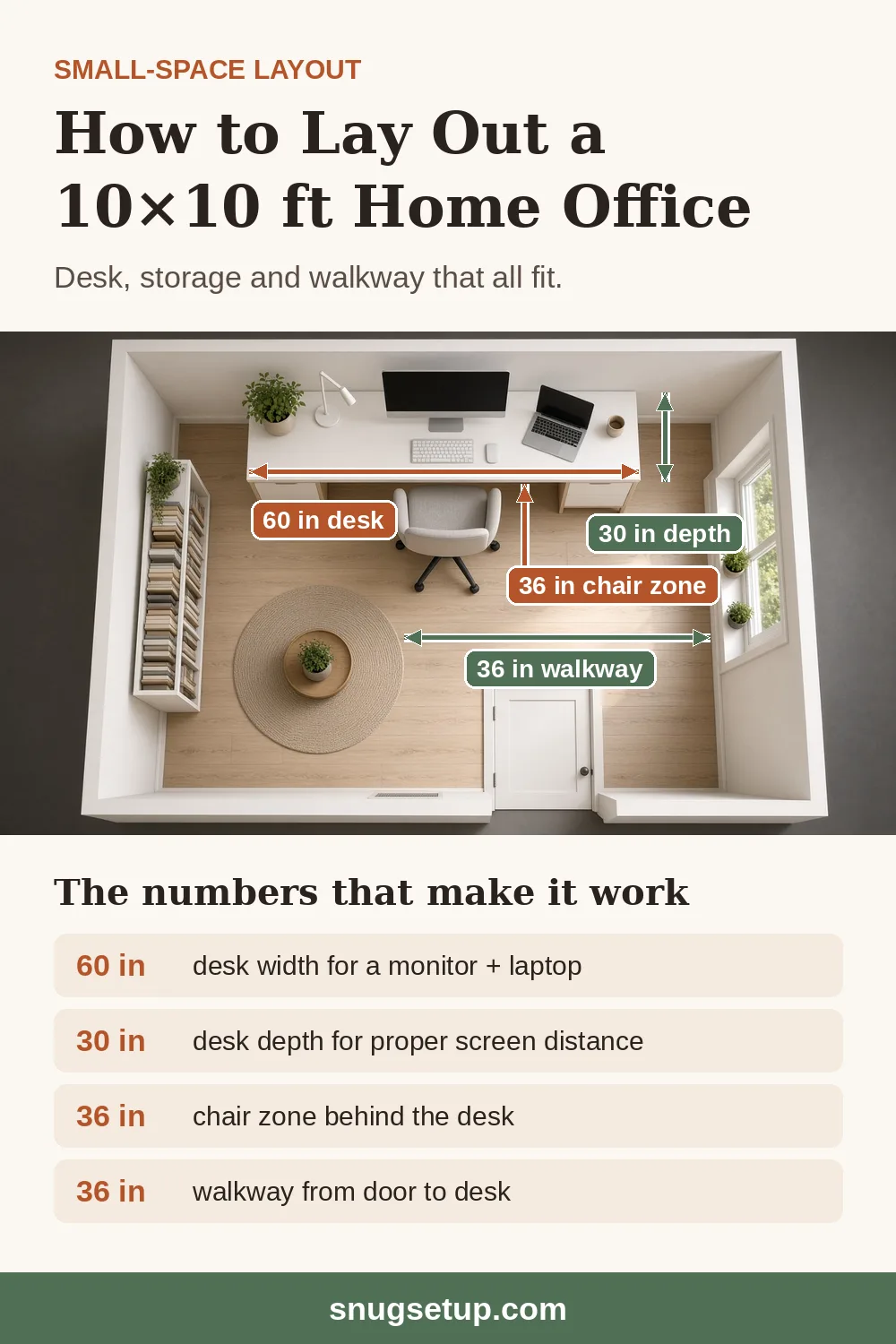
- Walkways. Keep about 30 to 36 inches clear where people walk past, and check the swing of any door (room, closet or wardrobe) next to the desk.
- Outlets and switches, and how far they are from the desk.
- Your seated elbow height. Sit with your feet flat and thighs roughly level, elbows bent at about 90 degrees, and measure from the floor to your forearm. That's roughly where the keyboard should be, often lower than a standard desk.
A few numbers come up again and again in small offices:
- Chair zone: about 36 inches from the desk edge to whatever is behind you; around 30 inches can work with an armless chair that tucks fully under the desk.
- Desk height: most fixed desks are 28 to 30 inches tall. That suits many average-height and taller adults, but shorter people often find it too high unless they raise the chair and add a footrest, or lower the keyboard on a tray.
- Desk depth: 18 to 20 inches is enough for a laptop; 24 inches fits a monitor at a comfortable distance, or use a monitor arm on a shallower desk.
- Knee space: keep the area under the desk clear of drawers and crossbars where your knees go, about 20 inches wide at minimum.
The layout photo near the top of this guide shows those numbers in a 10 × 10 ft room: a desk on the far wall, 36 inches of chair space behind it and a 36-inch path from the door.
Step 3: Choose a desk that fits
With your numbers, you can rule most desks in or out from the spec sheet. Start with depth, not width: depth is what pushes a desk into the walkway. Our best desks for small spaces guide is the full comparison; here's the short version by type.
- Small fixed desk. The simplest option; the IKEA MICKE (28 3/4" x 19 5/8") fits a narrow wall, alcove or closet.
- Small standing desk. An electric sit-stand desk lets you change position through the day and solves the "desk too high" problem, because you set the height to fit you. Compact frames start around 35 to 43 inches wide; compare them in our small standing desks guide. If you already have a desk you like, a standing desk converter sits on top of it instead, though it takes up desk depth. Want to walk while you work? A walking pad slides under a standing desk; see our under-desk treadmills for small apartments guide for floor space and desk height.
- Corner and L-shaped desks. Good when a corner would otherwise sit empty; an L-desk gives you two work surfaces, such as a monitor on one side and paperwork on the other. See our corner desks and small L-shaped desks guides, and measure both walls from the corner.
- Wall-mounted and fold-down desks. No legs and no floor footprint, and many fold to a few inches deep. They need studs or masonry and sit at one fixed height. Our wall-mounted desks guide compares them.
- Folding desks. Freestanding desks that fold flat for storage. See best folding desks for small spaces.
Two checks people skip: that the desk (or its box) fits through the door, and where the legs or feet sit. Long feet can block a filing cabinet that four corner legs wouldn't.
Step 4: Choose a chair that tucks in
In a small room, the chair often takes more floor than the desk. A big chair with fixed arms can't slide under a compact desk, so it sits in the walkway all day. Look for:
- Armless, flip-up or low arms, so the chair slides under the desk. Measure from the floor to the underside of the desk (or its drawer) and compare it with the chair's arm height at the seat height you use.
- A small base. The compact chairs we compare take up about 23.5 to 28 inches across, against 28 inches or more for many full-size task chairs.
- Seat height adjustment wide enough to get your elbows level with the desk while your feet stay flat. If you have to raise the chair so far that your feet dangle, plan on a footrest.
Our best compact office chairs guide compares footprints, arm heights and seat ranges side by side. If your desk is too high and you can't change it, an under-desk keyboard tray brings the keyboard down to elbow height instead, and adds a few inches of working depth on a shallow desk. On carpet or a wood floor you want to protect, a chair mat sized to the chair zone (36 x 48 inches suits most small desks) keeps the chair rolling easily and marks out the desk area.
Step 5: Set the screen, keyboard and chair for your body
This step decides whether your office is comfortable at 4 p.m., and it costs little or nothing. Work in this order, because each adjustment depends on the one before:
- Chair first. Adjust the seat so your feet are flat on the floor (or a footrest) and your thighs are roughly level. Sit all the way back so the backrest supports your lower back.
- Keyboard and mouse at elbow height. With your shoulders relaxed and elbows at about 90 degrees, your forearms should be roughly level with the keyboard. Keep the mouse right next to the keyboard, not off at a reach.
- Screen about an arm's length away. Sit back and reach out: your fingertips should land near the screen. The top of the screen should be at or slightly below eye level, so you look slightly down at the middle of it. If you wear bifocals or progressive lenses, set it a little lower.
- Keep the things you use most within easy reach, and the rest further away.
- Move. No position is right for eight hours. Stand up, walk around or change position regularly; this is where a sit-stand desk helps.
The WSJ video below walks through the same adjustments with an ergonomics expert, in just over three minutes:
On a laptop
A laptop can't put the screen and the keyboard in the right place at the same time. If you work on one all day, raise the screen on a laptop stand and use a separate keyboard and mouse. The stand also frees desk space under the laptop.
On a shallow desk
On a desk under about 20 inches deep, a monitor sitting on its own stand ends up too close to your face. A clamp-on monitor arm holds the screen above the back edge of the desk, so you get the full desk depth for your keyboard and can push the screen back to arm's length. If you can't clamp to your desk, or just need a few inches of height, a monitor stand or desk shelf raises the screen and gives you storage underneath.
With two screens
Two monitors on their own stands take most of a small desk. Put both on one dual mount clamped to the back edge, and check the desk width first: two 24-inch screens side by side are about 42 to 43 inches wide. Our guide to dual monitor setup for a small desk covers the measurements, layouts and three dual mounts.
Step 6: Light the desk and your face
Small rooms usually have one ceiling light, and it's in the wrong place: above and behind you, so your head shades the desk and your face is dark on camera. You want three kinds of light:
- Daylight from the side. If you can, turn the desk so the window is to your left or right. A sheer curtain softens direct sun.
- Task light on the desk. On a small desk, a lamp with a weighted base takes space you don't have. A clamp-on or wall-mounted desk lamp puts the light where you need it without using any desktop. If you use a monitor, a monitor light bar sits on top of the screen and lights the keyboard without glare on the screen, using no desk space at all.
- Light on your face for video calls. A small webcam light clipped to the monitor or laptop lights you from the front, which matters most in a closet or a corner facing a wall.
Step 7: Get power and cables under control
In a small room you see the back and underside of the desk from the bed or the couch, so cables make it look cluttered fast. The fix is to get the power strip and chargers off the floor and under the desk, so only one cord runs to the wall.
- Unplug everything and decide where the single cord to the wall will run.
- Mount a power strip under the back edge of the desk, in a tray, mesh net or box.
- Plug every device into that strip and coil the extra length into the tray.
- Run monitor and lamp cables down the back of the monitor arm or along the desk edge with clips.
- On a standing desk, leave enough slack for the desk's full height range and bundle the cables in a flexible spine from the desk to the floor.
Our cable management guide goes through that plan in detail, with clamp-on options for renters and fixes for steel desk legs. For a closet with no outlet, use a flat-plug extension cord along the baseboard rather than under a rug, or have an electrician add an outlet.
Step 8: Add storage without losing desk space
Anything stored on a small desktop takes away working space. Work in this order: under the desk, then up, then beside.
- Under the desk. Often the biggest empty storage space in the room: rolling carts, clamp-on drawers, shelves and hooks; see our under-desk storage ideas. Keep the area where your knees and feet go clear.
- Paper. If you keep files, leases or tax papers, a small filing cabinet that rolls under the desk or doubles as a side table keeps them in one place. Measure the clearance under the desk first.
- On the desk, go up, not out. Stackable drawers, an upright file sorter or a small hutch keep pens, chargers and notebooks in a footprint smaller than a sheet of paper. Our small desk organizers guide compares them, and a monitor shelf adds storage under the screen.
- On the wall. Shelves above the desk, clear of the monitor, keep books and supplies off the desktop.
In a bedroom or living room, being able to clear the desk at night is what makes a small home office livable.
The picks, in detail
IKEA MICKE Desk, 28 3/4" x 19 5/8"
Who it's for: Laptop users and renters with a narrow wall, an alcove or a closet about 30 inches wide.
The MICKE is one of the smallest proper desks IKEA sells: 28 3/4 inches wide and 19 5/8 inches deep, at a fixed 29 1/2 inches tall, with a drawer and a 110 lb load rating. It fits spaces a 40-inch desk can't, and it needs no drilling.
The trade-off is knee room: IKEA lists 24 3/4 inches of clearance under the drawer, so check your chair's arm height, or use an armless chair. It's too narrow for a monitor and a lamp side by side; for wider options, see our desks for small spaces guide.
Pros
- 28 3/4" wide fits narrow walls and closets
- No drilling; easy to move
- Drawer for supplies
Cons
- Fixed height
- 24 3/4" under the drawer
- Too narrow for a monitor plus a lamp
Key specs
- Size
- 28 3/4" W x 19 5/8" D
- Height or adjustment
- Fixed, 29 1/2" (24 3/4" under the desk)
- Capacity or fit
- 110 lbs (drawer 7 lbs)
- Type
- Fixed height
- Also
- One drawer, 24 3/8" x 14 1/8" inside
- Model
- 302.130.76
Price at IKEA's own store at time of writing: $69.99 (as of Oct. 21, 2026). Spec source
Check price at IKEA (opens in a new tab)VIVO 1B Series Electric Standing Desk, 43" x 24"
Who it's for: People who want one compact desk they can set to their own height, sitting or standing.
VIVO's 1B Series in the 43" x 24" size is one of the smallest electric sit-stand desks we cover. VIVO lists the top at 43.3" x 23.6", a 29.2" to 48.4" height range, a 220 lb weight rating and four memory presets. That range matters in a small office: a fixed desk is often too high for shorter people, and here you set the height to fit you.
The frame has two long feet rather than four corner legs, and it needs an outlet. More compact frames are in our small standing desks guide.
Pros
- Wide 29.2"–48.4" height range
- 43" wide fits a laptop plus a monitor
- 220 lb rating; 4 memory presets
Cons
- Needs an outlet
- Single motor
- Long feet can get in the way of storage
Key specs
- Size
- 43.3" x 23.6" top, 1" thick
- Height or adjustment
- 29.2" to 48.4"
- Capacity or fit
- 220 lbs
- Type
- Electric, single motor, 4 memory presets
- Also
- Lift speed 25 mm/s; noise under 50 dB (manufacturer figure)
- Model
- DESK-1B4B (1B Split Top Series, 43" x 24" option)
Price: check current price. Spec source
Check price at Amazon (opens in a new tab)Autonomous Desk Core
Who it's for: People with about 4 feet of wall who want more desktop than the 43-inch size.
The Desk Core is Autonomous's entry-level electric standing desk, with a 48" x 24" top and a height range of 29.4 to 47.5 inches including the top. The extra 5 inches of width over the VIVO is room for a lamp or a notebook beside a monitor and laptop.
Autonomous lists a single motor, a 176 lb lifting capacity, a noise level of 50 dB or less and a 2-year warranty. Its 24-inch depth matches a standard reach-in closet, so it's also our sit-stand pick in the closet office guide.
Pros
- 48" x 24" top
- Electric sit-stand, 29.4"–47.5"
- Free 30-day returns per the product page
Cons
- Needs about 4 ft of wall
- Needs an outlet
- Lower lifting capacity than the VIVO
Key specs
- Size
- 48" x 24" top, 0.7" thick
- Height or adjustment
- 29.4" to 47.5" (with top)
- Capacity or fit
- 176 lbs
- Type
- Electric, single motor
- Also
- Noise 50 dB or less; 2-year warranty; free 30-day returns (per product page)
- Model
- Desk Core
Price at Autonomous's own store at time of writing: $349 (as of Oct. 21, 2026). Spec source
Check price at Autonomous (opens in a new tab)IKEA FLINTAN Office Chair
Who it's for: Anyone who wants a simple armless task chair that slides out of the walkway.
The armless FLINTAN is 28 inches wide and deep overall, with a seat height of 17 3/4 to 22 7/8 inches. With no arms, it slides fully under most desks, which gives back floor space when you're not working. IKEA lists it as tested to ANSI/BIFMA x5.1 for 276 lb, with a 10-year limited warranty and a washable seat cover.
If you want arms, IKEA sells a FLINTAN with armrests too. Smaller bases and more adjustable chairs are in our compact office chairs guide.
Pros
- Armless: tucks under the desk
- BIFMA-tested, 276 lb
- Washable cover
Cons
- Basic adjustment only
- No armrests in this version
Key specs
- Size
- 28" W x 28" D overall; seat 18 1/8" W x 19 1/4" D
- Height or adjustment
- 17 3/4" to 22 7/8"
- Capacity or fit
- Tested for 276 lb
- Type
- Armless (add-on armrests sold separately)
- Also
- Max. height 44 7/8"; ANSI/BIFMA x5.1; 10-year limited warranty; washable seat cover
- Model
- FLINTAN 904.890.29 (armless)
Price at IKEA's own store at time of writing: $99.99 (as of Oct. 21, 2026). Black, armless; the FLINTAN with armrests is listed at $119.99. Spec source
Check price at IKEA (opens in a new tab)VIVO Pneumatic Single Monitor Arm, 17"-27" (STAND-V101O)
Who it's for: Anyone with a monitor on a desk under about 24 inches deep.
A monitor arm is usually the single upgrade that makes the biggest difference on a small desk. VIVO's STAND-V101O holds 17- to 27-inch screens weighing 4.4 to 14.3 lbs and reaches up to 18.5 inches forward, so you can set the screen at arm's length and at eye height, and get the space under it back.
It clamps to desks 0.4 to 3.2 inches thick, or mounts through a grommet hole, and its base is just 3.75" x 4". For heavier or larger screens, see our monitor arms guide.
Pros
- Frees the desk under the screen
- 18.5" reach
- Small 3.75" x 4" base
Cons
- Up to 27" and 14.3 lbs
- Needs a desk edge to clamp to
Key specs
- Size
- 18.5" max extension; 3.75" x 4" base
- Height or adjustment
- 6" to 16.5" (center of screen)
- Capacity or fit
- 4.4 to 14.3 lbs
- Type
- Gas spring, C-clamp or grommet
- Also
- 17"-27" screens; VESA 75/100; desk 0.4"-3.2" thick
- Model
- STAND-V101O
Price: check current price. Spec source
Check price at Amazon (opens in a new tab)Lepro Clamp Desk Lamp (USB, 5W Gooseneck)
Who it's for: Anyone on a small desk who needs task light without giving up desktop space.
This small Lepro lamp clamps to surfaces up to 1.97 inches thick and bends on a flexible gooseneck. Lepro lists 430 to 460 lumens, three color temperatures (3000K, 4200K and 6500K) and 10 brightness levels. It's USB-powered, so it can run from a monitor or laptop port or a USB charger (not included).
It's a simple task light for reading and paperwork, not a room light. For brighter lamps, wall lamps and other options, see our small desk lamps guide.
Pros
- Uses no desktop space
- Three color temperatures
- USB-powered
Cons
- Small light output
- USB adapter not included
Key specs
- Size
- Compact gooseneck with a slim LED head
- Height or adjustment
- Flexible gooseneck (no arm length published by Lepro)
- Capacity or fit
- Clamp, surfaces up to 1.97" thick
- Type
- 5W LED, 430–460 lm; 3000K / 4200K / 6500K, 10 brightness levels
- Also
- USB-powered (5V); 4.9 ft cord
- Model
- 310005 (white) / 310006 (black)
Price: check current price. Spec source
Check price at Amazon (opens in a new tab)VIVO Clamp-on Under Desk Mesh Cable Management, 36"
Who it's for: Anyone who wants the power strip and chargers off the floor without drilling into the desk.
VIVO's DESK-AC36MH is a 36.4" x 14.5" mesh net that hangs under the back edge of the desk on hand-tightened clamps. It holds a power strip, adapters and spare cable, hangs 5.5 to 7 inches below the desk and is rated for 11 lbs. It fits desktops 0.6 to 2.8 inches thick and needs 8.5 inches of clearance under the desk for its clamps.
VIVO also sells it in 24-, 44- and 55-inch widths. Our cable management guide covers trays, boxes and spines for other desks.
Pros
- No drilling
- Holds a full power strip
- Several widths
Cons
- Needs 8.5" clearance for the clamps
- Mesh is visible from the side
Key specs
- Size
- 36.4" x 14.5"
- Height or adjustment
- Hangs 5.5" to 7" below the desktop
- Capacity or fit
- 11 lbs
- Type
- Hand-tightened clamps, no drilling; desktops 0.6"–2.8" thick
- Also
- Needs 8.5" of clearance under the desk for the clamps
- Model
- DESK-AC36MH
Price: check current price. Spec source
Check price at Amazon (opens in a new tab)Three small home office layouts
1. The bedroom corner
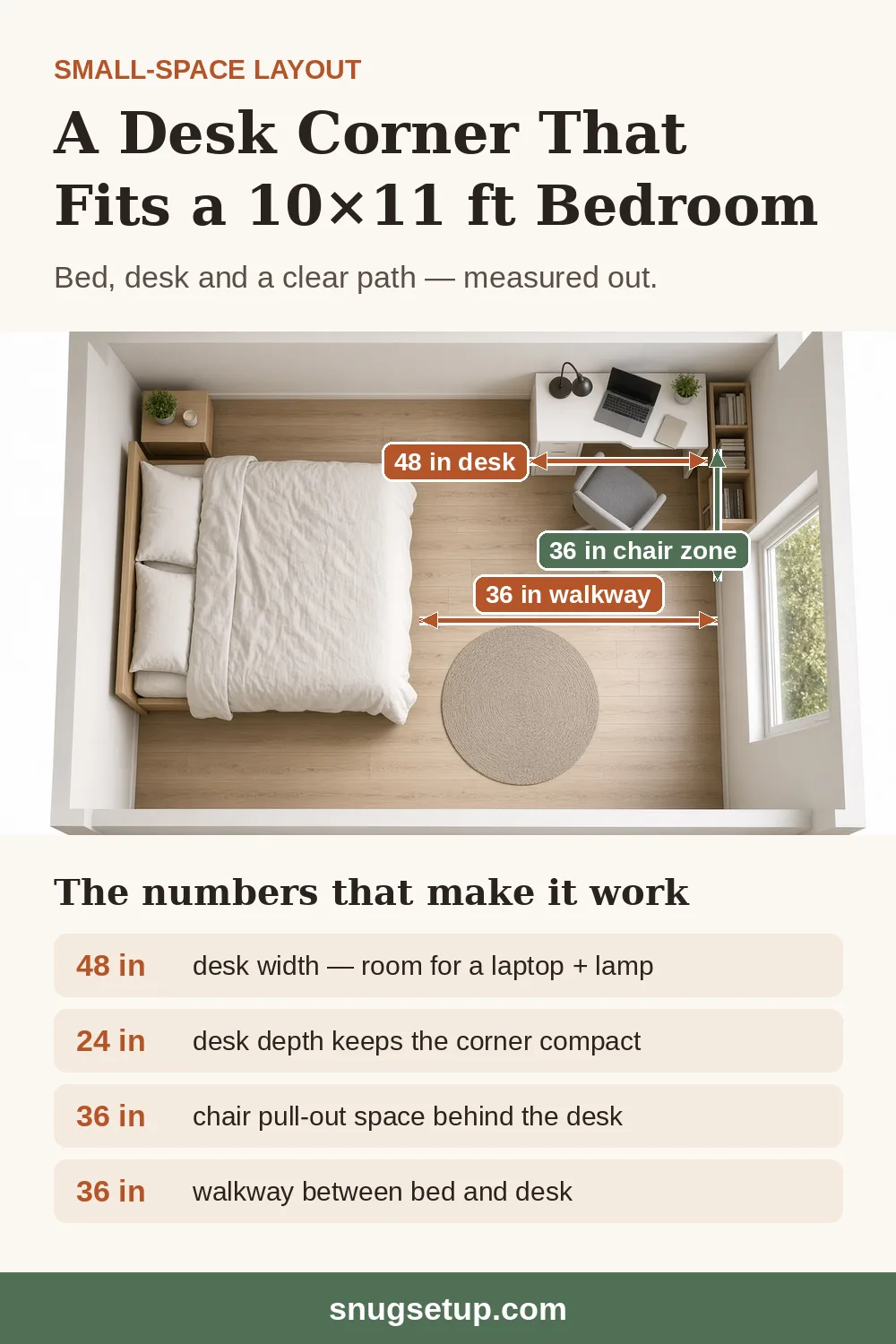
A 40- to 48-inch desk in the corner farthest from the door, the window to one side if possible, and the chair zone kept clear of the bed. The layout photo below fits a 48-inch desk, a 36-inch chair zone and a 36-inch walkway into a room of about 10 × 11 feet. Use the wall above the desk for shelves and the space under it for a rolling cart, so the desk clears at night. A corner desk or small L-desk fits more surface into the same corner. For six more ways to fit a desk around a bed, from under the window to the foot of the bed, see our small bedroom desk setup guide.
2. The closet office
A desk spanning a reach-in closet, about 24 inches deep, with the shelves raised to clear a monitor and about 36 inches of floor in front for the chair. A fold-down wall desk and a wall-mounted monitor let the whole office close away. See our cloffice guide for widths, power and ventilation.
3. The living room nook
A shallow desk on a free wall, a folding desk behind a door, or a C-shaped table that slides under the sofa. The goal is an office that disappears in the evening, so keep the kit small: a laptop on a stand, a clamp lamp and one storage box. The BuzzFeed Nifty video below shows a small office built around a narrow ladder desk with shelves above:
Small home office setup checklist
- Spot chosen, with an outlet nearby and the window to the side if possible
- Wall width, maximum desk depth, walkways and door swings measured
- Your seated elbow height measured
- Desk that fits the wall and leaves about 36 inches for the chair
- Chair that tucks under the desk, with your feet flat and elbows level with the keyboard
- Screen at arm's length, top at or slightly below eye level (laptop stand or monitor arm as needed)
- Task light on the desk and a light for your face on calls
- Power strip under the desk, one cord to the wall
- Storage under, above or beside the desk, and a place to clear the desk at night
All our small home office guides
These guides go deeper on each step. We add new ones as they're published.
Layout and setup
- Closet office (cloffice) setup: measurements, desk options and layouts
- Small bedroom desk setup: 7 layouts that work
- Cable management under a small or standing desk
- Under-desk storage ideas for small spaces
Lighting
- Best small desk lamps for tight desks
- Best monitor light bars for small desks
- Best webcam lights for video calls in a small office
Storage and organization
Desks
- Best desks for small spaces (our full desk guide)
- Best small L-shaped desks
- Best corner desks for small spaces
- Best wall-mounted and floating desks
- Best folding desks for small spaces
- Best laptop desks for bed and couch
- Best small standing desks
- Best standing desk converters for small desks
Chair, screen and keyboard
- Best compact office chairs
- Best monitor arms for small desks
- Best monitor stands and desk shelves for small desks
- Best laptop stands for small desks
- Best under-desk keyboard trays for small desks
- Best under-desk footrests
- Dual monitor setup for a small desk
- Best office chair mats for small spaces
- Best under-desk treadmills for small apartments
Gifts for small home offices

FAQ
How much space do you need for a home office?
A wall about 3 feet wide fits a laptop desk; about 4 feet fits a monitor, a laptop and a lamp. Plan about 36 inches in front of the desk for the chair. A 24-inch-deep reach-in closet can also hold a desk; see our closet office guide.
What do you need to set up a small home office?
At minimum: a desk that fits the space, a chair you can adjust so your elbows are level with the desk, a way to get the screen to eye level (a laptop stand plus a keyboard, or a monitor arm), a task light, and a power strip mounted under the desk. Storage and a webcam light come next.
How do I set up a home office in my bedroom?
Put the desk in the corner or on the wall farthest from the bed, with the window to the side if you can, and keep about 36 inches clear for the chair. A corner desk or fold-down wall desk uses the least floor.
What size desk is best for a small home office?
For a laptop, about 30 to 36 inches wide and 18 to 20 inches deep. For a laptop plus a monitor, 40 to 48 inches wide and about 24 inches deep, or a shallower desk with a monitor arm. Compare options in our best desks for small spaces guide.
How high should my monitor be?
The top of the screen should be at or slightly below eye level, about an arm’s length away, so you look slightly down at the middle of it. A monitor arm or monitor stand gets it there on a small desk.
Is a standing desk worth it in a small room?
It can be. A compact sit-stand desk takes the same floor as a fixed desk of the same size and lets you set the height to fit you. It needs an outlet. See our small standing desks guide.
Did you test these products?
No. We compared manufacturers’ published dimensions, height ranges and load ratings against common small-room sizes. See How We Research for details.
About this guide
This guide brings together the measurements, layouts and product comparisons from our individual setup, desk, chair, lighting, cable and storage guides. The ergonomic adjustments follow common office ergonomics guidance and the expert advice in the WSJ video above. Product specs come from the manufacturers' product pages, retrieved on the dates shown in the comparison table, and each product links to its source. The room photos are illustrative layouts, not photos of the products. We didn't test these products hands-on and don't publish star ratings.
Written by the SnugSetup Editorial Team. Read how we research and our affiliate disclosure. Spotted an error? Email [email protected].