Small-Space Ergonomics: How to Set Up a Comfortable Desk When You Don't Have Room
Disclosure: SnugSetup earns commissions when you buy through links on this page, at no extra cost to you. As an Amazon Associate I earn from qualifying purchases. Read our full disclosure.

Ergonomics advice usually assumes a corporate office: a 60-inch desk, a big adjustable chair and a few feet of carpet behind it. A small home office breaks most of those assumptions. The desk is shallow, the chair has to tuck in, the monitor sits wherever there's room, and the laptop often ends up doing everything. You can still get a comfortable, healthy setup in a small space. You just have to decide which numbers matter and which fixes take the least room.
This guide is our hub for that. We start with the measurements that published ergonomics guidelines recommend, then go through the body from the floor up: chair, desk and keyboard, screen, standing, and the floor space around you. Each section links to the guide where we compare specific products for that job.
- The numbers at a glance
- Chair: seat height, depth and arms
- Desk and keyboard height
- Screen distance and height
- If you work from a laptop
- Standing and moving
- Floor space around the desk
- A 10-minute checklist
- All our ergonomics guides
Where we quote a range, it comes from the University of Washington's office ergonomics design guide, which summarizes the US office furniture guideline ANSI/BIFMA G1-2013 and the workstation standard ANSI/HFES 100-2007. These are design guidelines for offices, not medical advice, and they're written to fit most adults; your own best setting depends on your body. We haven't tested the products named here hands-on. They come from our support guides, where we compare them on their makers' published specs.
TL;DR: Our top picks
- Chair that tucks under a small desk: Sweetcrispy Armless Office Desk Chair (PU leather, vertical-stitch seat) (Check current price). Armless, with an 18.1" x 16.3" listed footprint and a seat from 17.71" to 21.45".
- Lowers the keyboard on a fixed desk: VIVO Clamp-on Keyboard Tray, 27" (Check current price). Clamps on with no drilling and sits 1.5" to 2.75" below the desktop.
- For feet that don't reach the floor: VIVO Adjustable Foot Rest (STAND-FT01) (Check current price). A steel footrest that adjusts from 5" to 10 1/4".
- Small monitor with a stand that moves: Dell S2425HS 24-inch Monitor with Adjustable Stand (Check current price). 23.8" screen with 5.1" of height adjustment, swivel and pivot.
- Gets the screen off a shallow desk: VIVO Pneumatic Single Monitor Arm, 13"-32" (STAND-V001Q) (Check current price). Gas-spring arm for 13"–32" screens with 23.5" of reach.
- Raises a laptop screen: Rain Design mStand Laptop Stand (Check current price). Lifts a laptop 5.9" on a 10" x 7.5" base.
Comparison table
| Product | Size | Height or adjustment | Capacity or screen | Price |
|---|---|---|---|---|
| Sweetcrispy Armless Office Desk Chair (PU leather, vertical-stitch seat) | 18.1" W x 16.3" D (listing) | 17.71" to 21.45" | 250 lbs | Check price on Amazon |
| VIVO Clamp-on Keyboard Tray, 27" | 26.8" x 11" tray (32.5" wide including clamps), 0.6" thick | 1.5" to 2.75" below the desktop | 11 lbs | Check price on Amazon |
| VIVO Adjustable Foot Rest (STAND-FT01) | 10 1/8" x 15.7" platform; frame 14.4" x 15.7" at its widest | Platform adjusts from 5" to 10 1/4" | 55 lbs (Amazon listing); not for standing on | Check price on Amazon |
| Dell S2425HS 24-inch Monitor with Adjustable Stand | 21.2" W x 7.4" D (with stand) | 13.7" to 18.8" tall (5.1" height range) | 23.8" IPS (1920 x 1080), 100Hz | Check price on Amazon |
| VIVO Pneumatic Single Monitor Arm, 13"-32" (STAND-V001Q) | 23.5" max extension | 6.5" to 20" | 2.2 to 20 lbs | Check price on Amazon |
| Rain Design mStand Laptop Stand | 10" W x 7.5" D base | 5.9" (fixed) | Not listed | Check price on Amazon |
Specs and prices come from each manufacturer's own product page or spec sheet, retrieved Nov. 1, 2026, Oct. 21, 2026, Nov. 3, 2026. Prices shown are the manufacturer's own store prices, not Amazon prices. Prices change often; the retailer's page is always the final word.
The numbers at a glance
These are the ranges we use across SnugSetup. They're measured from the floor unless noted, and each comes with its source as cited in the UW guide.
| What | Range | Source |
|---|---|---|
| Chair seat height | Adjustable within about 15 to 22 inches, with at least 4.5 inches of range | ANSI/HFES 100-2007 |
| Seat depth | About 14–16 inches (smaller people), 16 inches (average), 17–19 inches (taller people) | ANSI/BIFMA G1-2013 |
| Armrest height, if adjustable | About 6.7 to 10.6 inches above the seat | ANSI/HFES 100-2007 |
| Seated keyboard height | About 22.6 to 29.4 inches | ANSI/BIFMA G1-2013 |
| Fixed-height desk | At least 28.5 inches high | ANSI/HFES 100-2007 |
| Knee room under the desk | At least 17.3 inches deep at the knee and 23.6 inches at the feet (22 and 26 inches recommended) | ANSI/HFES 100-2007 |
| Viewing distance, 19–24 in. screens | About 18 to 24 inches (15.7 inches minimum) | ANSI/BIFMA G1-2013 |
| Top of a 19–24 in. screen, seated | Adjustable within about 43 to 54 inches | ANSI/BIFMA G1-2013 |
| Center of the screen | About 15 to 20 degrees below eye level | ANSI/HFES 100-2007 |
| Standing keyboard height | About 38.3 to 48.7 inches | ANSI/BIFMA G1-2013 |
| Top of a 19–24 in. screen, standing | Adjustable within about 56.8 to 71.4 inches | ANSI/BIFMA G1-2013 |
| Floor behind the desk edge | 36 inches minimum, 48 inches recommended | UW guide |
Ranges this wide exist because they have to fit both shorter and taller adults. You don't need to hit every number. What matters is that your own setup lands inside them: feet supported, thighs roughly level, elbows near your sides with forearms about level at the keyboard, and the screen at a height and distance where you don't lean in or tip your head back.
Chair: seat height, depth and arms
Start with the chair, because every other height depends on it. Set the seat so your feet are flat on the floor (or on a footrest) and your thighs are about level. The guidelines in the UW summary call for a seat that adjusts within roughly 15 to 22 inches with at least 4.5 inches of range, so most gas-lift chairs cover it, but small "compact" chairs often start higher. Check the low end of the seat range on the listing if you're on the shorter side.
Seat depth is the number most small chairs get wrong in one direction or the other. A seat that's too deep presses into the back of your knees; one that's too shallow doesn't support your thighs. The BIFMA guideline as summarized by UW suggests about 16 inches for an average-size person, less for smaller people and more for taller ones. Small chairs tend to have shallow seats, which suits shorter people well.
Arms, and why armless works in a small room
The same guide notes that armrests shouldn't stop the chair from sliding under the desk, and recommends chairs whose arms can be removed or left off. In a small room that's the main reason to go armless: the seat tucks under the desk and the chair stops blocking the walkway. You lose a place to rest your forearms, so keep the keyboard close to the desk edge and let your forearms rest on the desk. If you'd rather have arms, look for arms that adjust within about 6.7 to 10.6 inches above the seat, or arms that flip up or come off.
- Compare three armless chairs by footprint and seat height in our best armless office chairs guide.
- Want a seat with no back that slides fully under the desk? See our best kneeling chairs guide.
- Prefer to sit higher and more upright, or perch at a sit-stand desk? Our saddle and active stools guide compares three backless stools by footprint and height range.
- For chairs with flip-up, removable or low arms, and IKEA's compact chairs, see our compact office chairs guide.
- Want a gaming chair that still fits a small room? Our gaming chairs for small rooms guide compares two with flip-up arms and a Small-size TITAN Evo.
- Short, and most chairs leave your feet dangling? Our office chairs for short people guide compares four chairs whose seats go down to 14.4 to 16.5 inches.
- Chair seat thin, hard or too deep? A seat cushion or lumbar pillow fixes it without a bigger chair. Our seat cushions and lumbar pillows guide compares two of each by thickness and size.
- On carpet, a chair that won't roll makes you lean forward instead of moving in. Our chair mats guide has small sizes that fit a tight desk zone.
Desk and keyboard height
Once the chair is set, the keyboard should sit at about elbow height, so your shoulders can relax and your forearms are roughly level. The BIFMA guideline, as summarized by UW, gives a seated keyboard-height range of about 22.6 to 29.4 inches from the floor. Most fixed desks are 28 to 30 inches tall, so they land at the very top of that range. That's fine for taller people and often too high for shorter people, who end up shrugging to type.
There are three space-friendly fixes, in order of how little room they take:
- Raise the chair and add a footrest. This brings your elbows up to the desk without changing the desk. A footrest takes floor under the desk, not floor in the room. Our under-desk footrests guide compares sizes and heights; the steel VIVO adjusts from 5 to 10 1/4 inches.
- Lower the keyboard on a tray. A clamp-on keyboard tray drops the keyboard a couple of inches below the desktop and frees the desk surface. Check knee clearance first: the UW guide recommends about 27 inches of vertical clearance under a keyboard tray's track while seated, and a tray pulls you further from the screen, so it adds to the floor you need behind the chair.
- Get a desk that adjusts. A small standing desk lets you set the exact seated height and stand too. It's the biggest change, but the most flexible if more than one person uses the desk.
Keep the keyboard and mouse narrow, too. A full-size keyboard's number pad pushes the mouse out to the side; our ergonomic keyboard and mouse for small desks guide compares a compact keyboard, a split keyboard, a vertical mouse and a trackball that fit a small desk.
Don't forget what's under the desk. The HFES standard, as summarized by UW, asks for at least 17.3 inches of depth at knee level and 23.6 inches at foot level. A drawer, a crossbar or a power strip can eat that, especially on cheap small desks and closet built-ins. If your knees hit something, move it before you buy anything.
Screen distance and height
The screen is where small desks cause the most trouble, because a shallow desk pushes the monitor too close. For 19- to 24-inch screens, the BIFMA guideline as summarized by UW suggests a viewing distance of about 18 to 24 inches, with 15.7 inches as the minimum, and a 30-inch-deep work surface to make room for that plus a keyboard. Many small desks are 20 to 24 inches deep.
How to get distance on a shallow desk
- Choose a smaller screen. A 22- to 24-inch monitor suits that viewing distance better than a 27-inch one. Our best small monitors for small desks guide compares three by width and stand depth.
- Use an arm. A clamp-on monitor arm lifts the screen off the desk and lets you push it to the back edge or float it over the wall gap. The UW guide suggests 8 to 24 inches of horizontal reach for desks 30 to 36 inches deep.
- Use a riser with room underneath. A monitor stand raises the screen and gives you a shelf for the keyboard when you're not typing.
Screen height
For a 19- to 24-inch screen in an upright seated posture, the BIFMA guideline as summarized by UW gives a range of about 43 to 54 inches from the floor to the top edge of the screen. The HFES standard places the center of the screen about 15 to 20 degrees below eye level. In plain terms: the top of the screen at or slightly below eye level, tilted back a little, so you look slightly down into it. If you wear bifocals or progressive lenses, you'll probably want it lower.
A tilt-only stand puts the screen at a fixed height, so check where the top lands before you rely on it. A stand that adjusts, like the Dell S2425HS's 5.1 inches of travel, or an arm, solves this without extra parts. If you use two screens, keep the one you look at most straight in front of you; our dual monitor setup guide covers layouts for small desks.
If you work from a laptop
A laptop forces a choice: if the keyboard is at the right height, the screen is too low, and if the screen is at the right height, the keyboard is too high. The UW guide doesn't recommend laptops for routine desk work without an external monitor, keyboard and mouse. You don't need much to fix it:
- Raise the laptop on a laptop stand so the top of its screen is near eye level, and type on a separate keyboard and mouse. The mStand lifts a laptop 5.9 inches on a 10 x 7.5-inch base, and folding stands pack away if the desk doubles as something else.
- If you add a monitor, line up the laptop screen's top edge with the monitor's top edge, or use the laptop as the second screen, set lower and to one side.
- Working from bed or the couch now and then is fine; our laptop desks for bed and couch guide covers trays that raise the laptop off your lap. For daily work, though, a desk setup is kinder to your neck.
Standing and moving
Standing isn't automatically better than sitting; the benefit is changing position during the day. The BIFMA guideline, as summarized by UW, gives a standing keyboard-height range of about 38.3 to 48.7 inches and a top-of-screen range of about 56.8 to 71.4 inches for 19- to 24-inch screens. A sit-stand desk needs to reach both your seated and standing heights; the UW guide's recommended range for an electric sit-stand desk is about 22 to 50 inches, wider than most small desks offer, so check that the range on the listing covers you.
- Small sit-stand desks: our small standing desks guide compares compact frames by top size and height range.
- Converters on an existing desk: a standing desk converter sits on top of your desk. UW recommends converters that rise about 16 to 20 inches above the desk and, ideally, let the keyboard sit 2 to 4 inches below it.
- Walking while you work: an under-desk treadmill slides under a bed or sofa when you're done; that guide includes the storage sizes.
- Pedaling while you sit: an under-desk bike or seated elliptical keeps your legs moving at a seated desk, as long as your knees clear the underside. Our under-desk bikes for small spaces guide compares four by footprint, height and where they store.
- Mats and balance boards: a contoured mat or a small rocker board gives you something softer to stand on and a reason to shift your weight. Our standing desk mats and balance boards guide compares three by footprint and how they store.
- Perching between sitting and standing: a saddle or active stool lets you lean at a raised desk instead of standing the whole time. See our saddle and active stools for small desks.
- Feet: shifting your feet helps both sitting and standing. A footrest gives you a second position at a seated desk.
Floor space around the desk
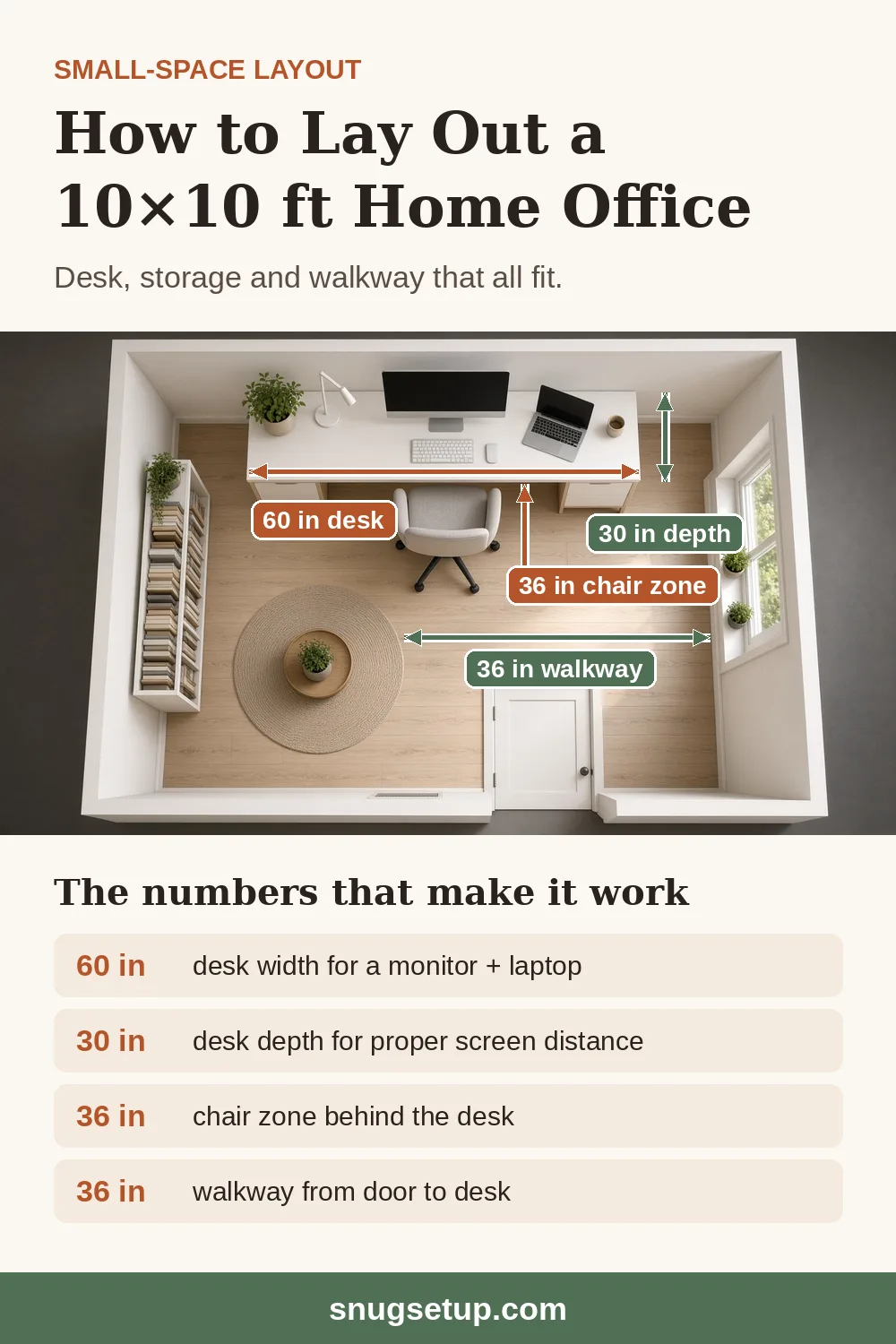
This is the part most small-space guides skip. The UW guide recommends at least 48 inches of floor behind the front edge of the desk so you can push back, stand up and sit down again easily, and treats 36 inches as the minimum. In a bedroom or closet office, 48 inches is often more than you have. Our own planning numbers, used across our layout guides, are about 36 inches from the desk edge to whatever is behind you, and around 30 inches with an armless chair that tucks fully under the desk.
A few ways to make a tight desk zone work:
- Pick a chair that tucks in. An armless chair with a small base gives back the most floor when you aren't sitting in it.
- Keep the keyboard on the desk rather than a tray if floor is tighter than height. A pulled-out tray pushes you further back; UW suggests 48 inches behind the desk to extend one fully.
- Put the desk where the chair backs into open floor, not into a bed edge or a door swing. Our small bedroom desk setup and closet office setup guides have layouts with the clearances drawn in.
The overhead plan below shows a 10 x 10 ft office with a 60-inch desk and a 36-inch chair zone. For the full step-by-step setup, from choosing the spot to lighting and storage, see our guide to setting up a small home office.
The picks, in detail
Sweetcrispy Armless Office Desk Chair (PU leather, vertical-stitch seat)
Who it's for: Shorter people, and anyone whose chair blocks the walkway when it's pulled out.
The Sweetcrispy armless chair is the smallest in our armless chairs guide: Amazon lists it at 18.1 x 16.3 inches, with a seat from 17.71 to 21.45 inches and a 250-pound rating. The low seat start suits shorter people at a standard desk, and with no arms it slides under the desktop when you're done. It has a low back, so taller people should look at the other chairs in that guide. The listing says it's BIFMA-certified.
Pros
- Seat starts low (17.71")
- Tucks fully under most desks
- Small listed footprint
Cons
- Low back, small seat
- No forearm support
Key specs
- Size
- 18.1" W x 16.3" D (listing)
- Height or adjustment
- 17.71" to 21.45"
- Capacity or screen
- 250 lbs
- Type
- Armless; low back with U-shaped lumbar support; 360° swivel; casters
- Also
- PU leather over high-density foam; BIFMA-certified (listing); 34.25" tall overall
- Model
- Armless PU leather task chair, beige white
Price: check current price. Spec source
Check price at Amazon (opens in a new tab)VIVO Clamp-on Keyboard Tray, 27"
Who it's for: Shorter people at a 29- to 30-inch desk who shrug their shoulders to type.
VIVO's clamp-on tray drops the keyboard 1.5 to 2.75 inches below the desktop without drilling, on a 26.8 x 11-inch tray that holds 11 pounds and slides out 8.5 inches. It clamps desks 0.5 to 1.25 inches thick. Check your knee room before you buy, and remember that a pulled-out tray adds to the floor you need behind the chair. More options, including narrower and thicker-desk models, are in our keyboard trays guide.
Pros
- No drilling
- Frees the desktop
- Brings the keyboard closer to seated keyboard-height ranges
Cons
- Only 1.5"–2.75" lower
- Needs knee room and a desk 0.5"–1.25" thick
Key specs
- Size
- 26.8" x 11" tray (32.5" wide including clamps), 0.6" thick
- Height or adjustment
- 1.5" to 2.75" below the desktop
- Capacity or screen
- 11 lbs
- Type
- C-clamps, no drilling; desks 0.5"–1.25" thick
- Also
- Slides out 8.5"; 12.3" track
- Model
- MOUNT-KB05E (black, 27")
Price: check current price. Spec source
Check price at Amazon (opens in a new tab)VIVO Adjustable Foot Rest (STAND-FT01)
Who it's for: Anyone who raises the chair to reach the desk and ends up with dangling feet.
The VIVO STAND-FT01 is a steel footrest with a 10 1/8 x 15.7-inch platform that adjusts from 5 to 10 1/4 inches, the widest range in our footrests guide. It takes floor under the desk rather than in the room. It's for resting your feet, not for standing on.
Pros
- Widest height range in our footrest guide
- Uses space under the desk
- Steel frame
Cons
- Fixed positions, not continuous
- Not for standing on
Key specs
- Size
- 10 1/8" x 15.7" platform; frame 14.4" x 15.7" at its widest
- Height or adjustment
- Platform adjusts from 5" to 10 1/4"
- Capacity or screen
- 55 lbs (Amazon listing); not for standing on
- Type
- Steel frame with several height positions; textured anti-slip platform, padded feet
- Also
- 3-year VIVO warranty; 4.4 stars, about 870 Amazon ratings (Oct. 17, 2026)
- Model
- STAND-FT01 (black)
Price: check current price. Spec source
Check price at Amazon (opens in a new tab)Dell S2425HS 24-inch Monitor with Adjustable Stand
Who it's for: People who work at a screen all day and want to set its height without adding an arm.
The Dell S2425HS is a 23.8-inch, 1920 x 1080 monitor whose stand adjusts 5.1 inches in height (Dell's figure), tilts, swivels and pivots. Amazon lists it at 21.17 inches wide and 7.41 inches deep on its stand. That height range makes it easier to put the top of the screen at eye level than with a tilt-only stand. It's compared with two other small screens in our small monitors guide.
Pros
- Height-adjustable stand
- Swivel and pivot
- VESA 100 x 100 mm
Cons
- No USB-C or DisplayPort
- Heavier than tilt-only small monitors (7 lb)
Key specs
- Size
- 21.2" W x 7.4" D (with stand)
- Height or adjustment
- 13.7" to 18.8" tall (5.1" height range)
- Capacity or screen
- 23.8" IPS (1920 x 1080), 100Hz
- Type
- Height, tilt (-5° to +21°), swivel (±30°) and pivot (±90°); VESA 100 x 100 mm
- Also
- 2 x HDMI, 2 x 5W speakers; 7 lb
- Model
- S2425HS, ash white
Price: check current price. Spec source
Check price at Amazon (opens in a new tab)VIVO Pneumatic Single Monitor Arm, 13"-32" (STAND-V001Q)
Who it's for: Anyone with a desk under about 24 inches deep who sits too close to the screen.
VIVO's STAND-V001Q is a gas-spring arm for 13- to 32-inch screens weighing 2.2 to 20 pounds, with 23.5 inches of maximum reach and a 6.5- to 20-inch height range on the pole. It clamps desks 0.5 to 3 inches thick or uses a grommet, and fits VESA 75 and 100 patterns. Pushed to the back edge of the desk, it gives you more viewing distance than a stand can. Our monitor arms guide compares it with budget and dual arms.
Pros
- 23.5" reach
- Frees the desk under the screen
- Fits 0.5"–3" desks
Cons
- Needs a solid desk edge to clamp
- Arm and clamp add setup time
Key specs
- Size
- 23.5" max extension
- Height or adjustment
- 6.5" to 20"
- Capacity or screen
- 2.2 to 20 lbs
- Type
- Gas spring, C-clamp or grommet
- Also
- 13"-32" screens; VESA 75/100; desk 0.5"-3" thick
- Model
- STAND-V001Q
Price: check current price. Spec source
Check price at Amazon (opens in a new tab)Rain Design mStand Laptop Stand
Who it's for: Laptop users who type on a separate keyboard and mouse.
Rain Design's mStand is a one-piece aluminum stand that lifts a laptop 5.9 inches on a 10 x 7.5-inch base, and the maker says it fits up to a 16-inch MacBook Pro. It's fixed, so it suits a laptop that lives on the desk. Folding and adjustable stands are in our laptop stands guide.
Pros
- Small 10" x 7.5" base
- Raises the screen 5.9"
- Rear cable hole
Cons
- Fixed height
- Needs a separate keyboard and mouse
Key specs
- Size
- 10" W x 7.5" D base
- Height or adjustment
- 5.9" (fixed)
- Capacity or screen
- Not listed
- Type
- Fixed, single piece of aluminum
- Also
- Fits 16" MacBook Pro (per maker); 2" rear cable hole; stand weighs 3 lbs
- Model
- mStand
Price: check current price. Spec source
Check price at Amazon (opens in a new tab)A 10-minute checklist
- Seat height: feet flat (or on a footrest), thighs about level.
- Seat depth: a gap of a few fingers between the seat edge and the back of your knees.
- Back: sit back against the backrest, with its curve at your lower back.
- Keyboard: at about elbow height, close to the desk edge, shoulders relaxed.
- Mouse: right next to the keyboard, at the same height.
- Screen distance: about an arm's length, roughly 18 to 24 inches for a 22- to 24-inch screen.
- Screen height: top edge at or slightly below eye level, tilted back a little.
- Knee room: nothing under the desk that your knees or feet hit.
- Floor: enough room behind the chair to push back and stand up without hitting anything.
- Light: no window or lamp reflected in the screen. Our monitor light bars and small desk lamps guides cover lighting a small desk.
All our ergonomics guides
- Best armless office chairs for small spaces
- Best compact office chairs
- Best kneeling chairs for small spaces
- Best saddle and active stools for small desks
- Best gaming chairs for small rooms
- Best office chairs for short people
- Best seat cushions and lumbar pillows for small-space chairs
- Best office chair mats for small spaces
- Best standing desk mats and balance boards
- Best under-desk footrests
- Best keyboard trays for small desks
- Best ergonomic keyboard and mouse for small desks
- Best small monitors for small desks
- Best monitor arms for small desks
- Best monitor stands for small desks
- Best laptop stands for small desks
- Dual monitor setup for a small desk
- Best small standing desks
- Best standing desk converters for small desks
- Best under-desk treadmills for small apartments
- Best under-desk bikes for small spaces
- How to set up a small home office

FAQ
What is the right desk height for a small home office?
The one that puts your keyboard at about elbow height. The ANSI/BIFMA G1-2013 guideline, as summarized by the University of Washington, gives a seated keyboard-height range of about 22.6 to 29.4 inches. Most fixed desks are 28 to 30 inches tall, so shorter people usually need a higher chair with a footrest, or a keyboard tray.
How far should I sit from my monitor on a small desk?
For a 19- to 24-inch screen, about 18 to 24 inches, with 15.7 inches as the minimum, per BIFMA G1-2013 as summarized by UW. On a shallow desk, a smaller monitor or a monitor arm pushed to the back edge helps you get that distance.
Are armless chairs bad for ergonomics?
Not necessarily. The UW guide recommends chairs whose arms can be removed or left off, and notes that arms shouldn't stop the chair from sliding under the desk. Without arms, rest your forearms on the desk with the keyboard close to the edge.
How much space do I need behind my desk chair?
The UW guide recommends at least 48 inches behind the front edge of the desk, with 36 inches as the minimum. In small rooms we plan on about 36 inches, or around 30 inches with an armless chair that tucks fully under the desk.
Is it OK to work from a laptop all day?
The UW guide does not recommend laptops for routine desk work without an external monitor, keyboard and mouse. A laptop stand plus a separate keyboard and mouse is the smallest fix.
Do you reproduce the BIFMA or HFES standards?
No. We quote individual ranges as facts, with their source, from the University of Washington's publicly available design guide. The standards themselves are published by BIFMA and HFES.
About this guide
The ranges in this guide come from the University of Washington's office ergonomics furniture design guide (retrieved Nov. 3, 2026), which cites ANSI/BIFMA G1-2013 and ANSI/HFES 100-2007 for each figure. We quote them as facts with their source and don't reproduce the standards. Our own small-room planning numbers (about 36 inches behind the desk, or 30 inches with an armless chair that tucks in) are the ones we use across our layout guides. The products named here are picks from our support guides, where their specs were read from the makers' pages and Amazon listings on the dates given in each guide, and each has a real product video in that guide. We did not test these products hands-on and don't publish star ratings of our own.
Written by the SnugSetup Editorial Team. Read how we research and our affiliate disclosure. Spotted an error? Email [email protected].